
Agentic workflows are AI-driven automation systems that decouple business logic from software interfaces, allowing a single agent to replace the context-switching across 15 or more SaaS applications. Rather than navigating dashboards, employees issue commands that trigger chains of skills and plugins — the agent handles the execution across all connected tools. This architectural shift, accelerated by systems like Claude Co-work in 2026, is threatening billions in traditional SaaS market cap by demoting applications from workspaces to databases.
Recent developments in agent environments, specifically the introduction of architecture like Claude Co-work, have introduced a new paradigm: the ability to decouple the logic of work from the application that stores the data. By using "plugins" and "skills," AI agents can now act as the universal interface for the enterprise, allowing users to bypass the context switching of 15 different apps a day.
However, for operations leaders, this innovation brings a distinct double-edged sword. While the productivity gains are undeniable, the current method of deployment - often relying on local files and ad-hoc sharing - creates a massive governance vacuum. This article explores the mechanics of this new agentic stack and the strategic imperatives for controlling it.
The anatomy of the new agentic stack
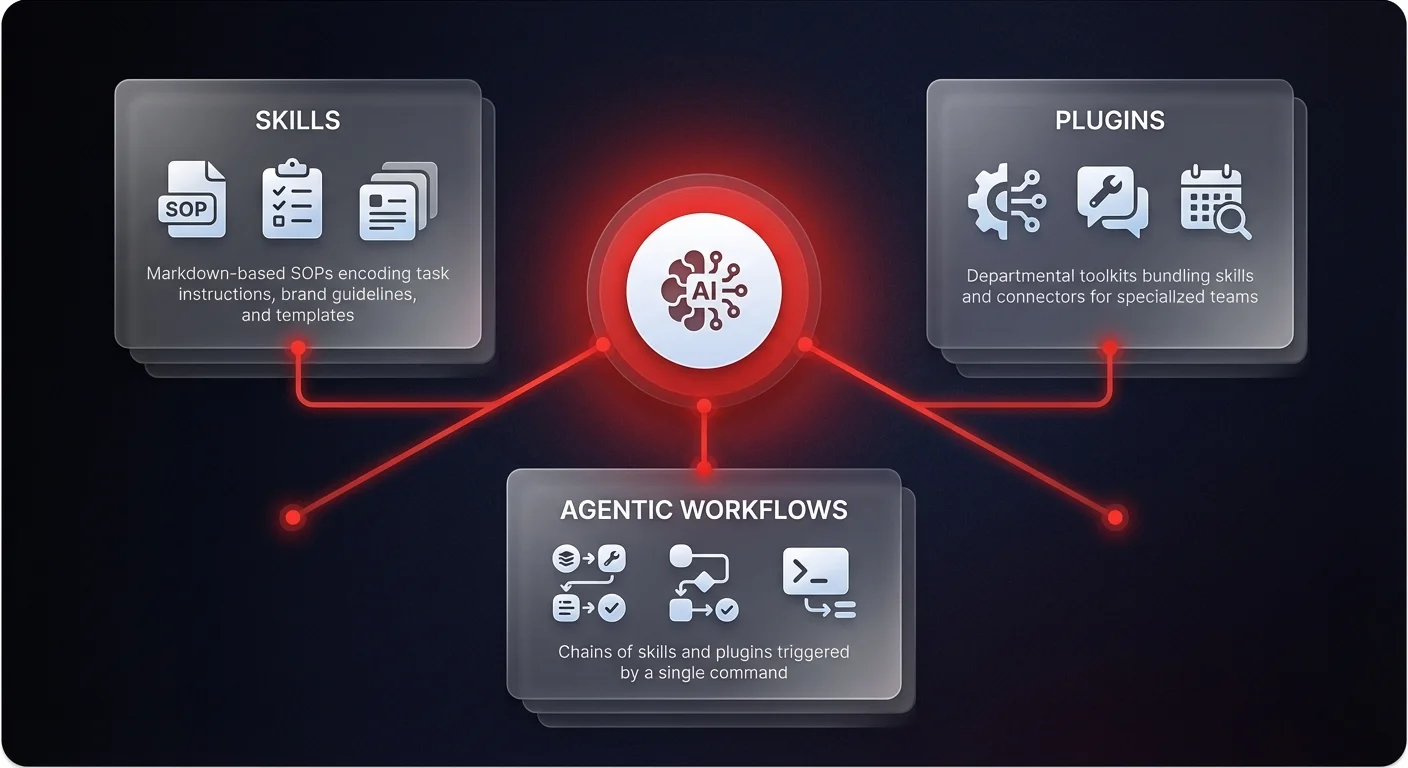
To understand why this shift is so disruptive, we must look at the technical architecture driving it. The new wave of AI capability isn't just about a smarter chatbot; it is about a modular operating system for work. This system is built on three core components: skills, plugins, and connectors.
Skills: the digitization of SOPs
At the foundational level, we have "skills." In this new architecture, a skill is essentially a markdown file (.md) that acts as a sophisticated system prompt. It contains specific instructions on how to execute a task, combined with knowledge sources like brand guidelines, tone of voice documentation, or template examples.
For instance, a "LinkedIn Writer" skill isn't just a request to "write a post." It is a codified file containing the exact steps for drafting, the required profile background, hook templates, and examples of successful past posts. When a user invokes this skill, the agent isn't guessing; it is executing a documented standard operating procedure (SOP).
Plugins: the departmental USB stick
If skills are individual capabilities, "plugins" are the toolkits. Think of a plugin like a digital USB stick that you plug into your AI agent to give it departmental expertise. A Customer Support plugin, for example, might bundle skills for "Response Drafting" and "Escalation Protocols" alongside connectors to the ticketing system.
This packaging allows for specialization. Instead of a generic AI, a finance team gets a Finance Plugin equipped with tax code context and invoice processing skills, while the sales team gets a Sales Plugin designed for call prep and outreach.
Agentic workflows: chaining logic
The true power emerges when these elements are combined into "agentic workflows." This allows users to chain multiple skills together into a single command. A complex task like "Repurpose Video" can trigger a cascade of actions: extracting a transcript, invoking a blog writing skill, passing that output to a social media drafting skill, and finally triggering a newsletter creation skill. The agent moves data between these logic blocks autonomously, transforming a multi-hour human process into a single execute command.
The death of the "app hop"
The immediate threat to legacy SaaS providers - companies like Salesforce, ServiceNow, or Adobe - is the potential loss of the user. The average knowledge worker jumps between roughly 15 different software applications daily. Each switch incurs a cognitive tax, requiring the user to adjust to a new interface and workflow.
With plugins and connectors, the AI agent becomes the centralized interface. It connects to the underlying data (via API or browser tools) but keeps the user in a single environment. The SaaS platform is demoted from a "workspace" to a "database."
For example, in a traditional workflow, a salesperson might research a lead in LinkedIn, draft an email in Gmail, and update a record in Salesforce. In an agentic workflow using a Sales Plugin, the user simply commands the agent to "prep for the call." The agent accesses the necessary data from all three sources, processes it using defined skills, and presents the output. The user never logs into Salesforce — a pattern that's central to how AI sales intelligence platforms are reimagining the rep's daily workflow.
This creates a 10x speed improvement for the employee, but it fundamentally changes the vendor landscape. If the agent controls the workflow, the stickiness of the underlying SaaS application evaporates.
The operational nightmare: the "zip file" era
While the technology is impressive, the current deployment model represents a massive risk for mid-market and enterprise companies. Right now, the primary mechanism for sharing these powerful custom plugins is rudimentary: employees are literally emailing zip files to one another.
If a marketing manager builds a high-performing "Content Engine" plugin on their local machine, it exists solely in their local environment. To share it with a colleague, they must export the code as a zip file. The colleague then imports it — the kind of fragile, siloed approach that AI marketing content automation platforms are designed to replace with governed, centralized workflows.
From an operational perspective, this is a governance crisis waiting to happen - a new form of "Shadow AI" that is far more dangerous than Shadow IT.
Version control chaos
When workflows are shared via static files, version control becomes impossible. If the marketing manager updates the brand guidelines in the master skill, the six colleagues who downloaded the zip file last week are now using outdated logic. The company creates a fractured reality where every employee is executing processes slightly differently based on which version of the "plugin" they possess.
Data sovereignty and security
Local execution means local data access. When employees build custom connectors to internal systems, they are often bypassing enterprise-grade security controls. Furthermore, business-critical logic - the company's proprietary way of doing work - is trapped in markdown files scattered across hundreds of laptops. If an employee leaves, their "skills" and "plugins" leave with them.
The integration gap
The vision of agentic workflows promised seamless integration, but local plugins often rely on browser-based execution or personal API keys. This is fragile. A change in a website's DOM elements or an API update can break the workflow for everyone, with no central observability to alert the IT team.
Moving from local experiments to sovereign systems
For CEOs and COOs, the goal should not be to ban these tools - the efficiency gains are too significant to ignore. Instead, the goal is to professionalize them. We must move from an era of "desktop agents" to "sovereign enterprise agents."
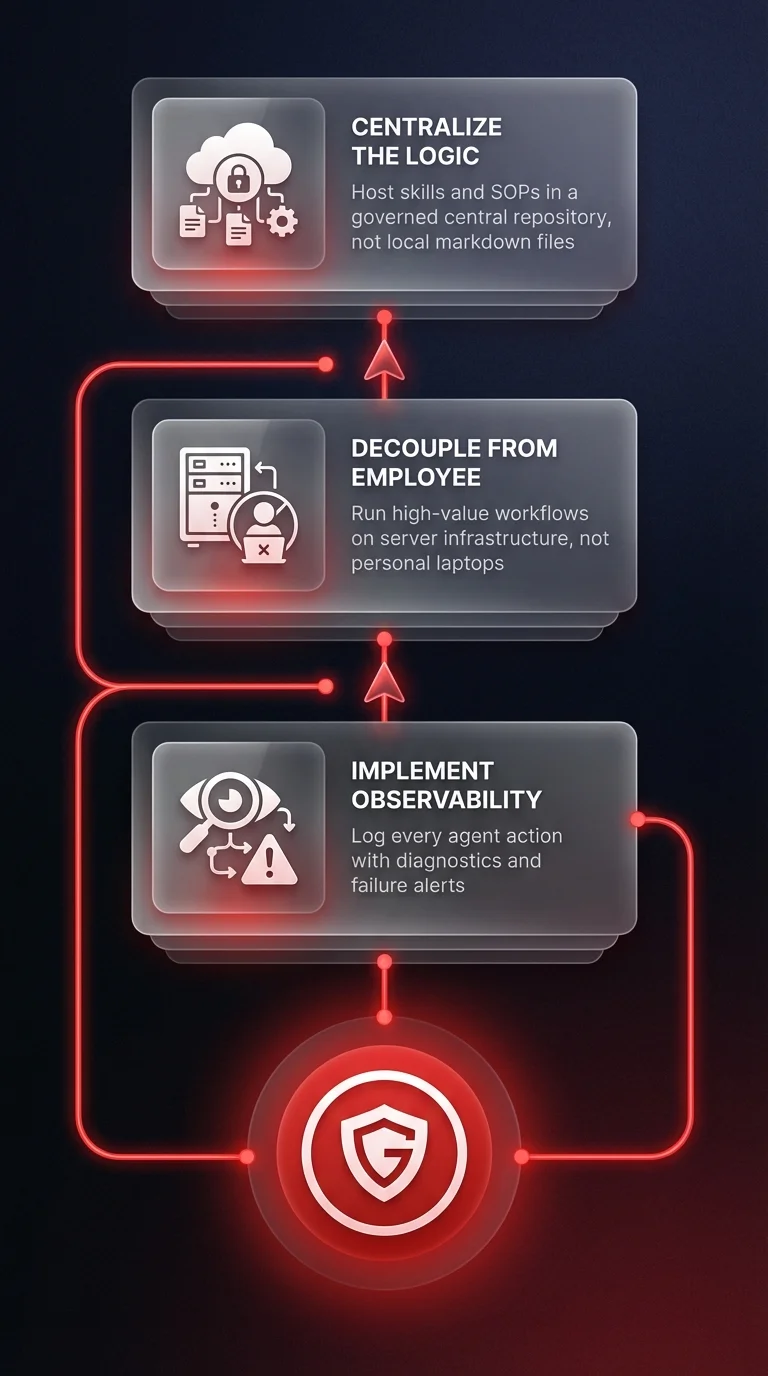
1. Centralize the logic
Do not allow critical business logic to live in local markdown files. The definitions of your "skills" (your SOPs) should be hosted in a central, governed repository. This ensures that when a process changes, the agentic workflow updates instantly for every user in the organization.
2. Decouple the agent from the employee
High-value workflows should not depend on a specific employee's laptop being open. An agentic workflow for "Customer Onboarding" should run on server-side infrastructure. It should be an asset owned by the company, not a personal productivity hack owned by a manager.
3. Implement observability
You cannot manage what you cannot see. If a plugin fails, or if an agent hallucinates during a critical step, operations leaders need to know. Sovereign agent infrastructure provides logs and diagnostics that local "co-work" environments cannot match.
The future is agentic, but it must be governed
The ability to create custom plugins and skills is democratizing software development. Non-technical employees can now build automation tools that previously required engineering resources. This creates a surge in innovation, but it also demands a surge in discipline.
The winners of this new economy won't just be the companies that adopt AI agents; they will be the companies that treat agents as infrastructure rather than personal utilities. The shift from SaaS interfaces to agent interfaces is inevitable. The question for leadership is whether that shift results in a streamlined, automated enterprise or a chaotic web of ungoverned zip files.
To capture the value without the risk, organizations must adopt a strategy of sovereign AI - ensuring that while the interface may be agentic, the control remains strictly human.