
Desktop AI agents are autonomous software programs that execute complex, multi-step workflows directly on a user's local machine, with direct access to file systems and web browsers. Unlike traditional chatbots, tools like Anthropic's Claude Desktop Co-work mode can read and write files, orchestrate parallel sub-agents, and produce finished assets end-to-end. For operations leaders, this represents both a major productivity leap and a new governance challenge — as business-critical logic shifts from monitored enterprise systems to uncontrolled local machines.
For operations leaders and COOs, this represents a pivotal moment. On one hand, the productivity gains are undeniable. A single marketing manager can now replicate the output of a small team using local agentic workflows. On the other hand, this shift introduces a new, invisible layer of operational risk. When critical business logic lives in a zip file on a laptop rather than a governed server, the organization loses visibility and control. This article explores the mechanics of this new desktop agent capability, the specific workflows it enables, and the urgent governance questions it raises for scaling companies.
From chat to co-work: the evolution of execution
The friction of the copy-paste loop has long been the bottleneck of AI adoption. In a traditional workflow, an employee creates a project brief, uploads it to a cloud LLM, waits for a response, and then manually transfers that data into a slide deck or spreadsheet. The new "Co-work" paradigm eliminates this friction by bringing the AI directly to the data source.
Recent capabilities released for Claude Desktop demonstrate exactly how this works. By selecting a specific local folder as a workspace, the AI gains the ability to read and write files directly to the user's hard drive. It is no longer a passive conversationalist; it is an active teammate with file system privileges.
Consider the creation of a strategy deck. In this new workflow, a user simply drops a call transcript, brand guidelines, and a presentation template into a folder. They then issue a single prompt. The agent analyzes the transcript, references the guidelines to ensure brand consistency, and generates a structured presentation, saving the actual file back to the folder. The user doesn't copy text; they receive a finished asset.
This shift from "text-in, text-out" to "file-in, file-out" changes the unit of work. We are not automating paragraphs; we are automating deliverables. For operations leaders, this proves that the technology is ready for substantive work, but it also highlights that the "work" is happening outside of monitored enterprise systems.
The power of parallel agent architecture
Perhaps the most significant technical leap in these desktop agents is the ability to orchestrate parallel tasks. True agentic workflows are rarely linear; they require multiple distinct actions happening simultaneously. The latest desktop tools handle this by spinning up "sub-agents" - specialized instances of the model dedicated to specific parts of a complex request.
Take a comprehensive marketing campaign as a prime example. A user can set up a project folder containing raw product images, a master spreadsheet of SKUs, and a brand voice guide. With a single instruction, the desktop agent can split the job into three parallel tracks:
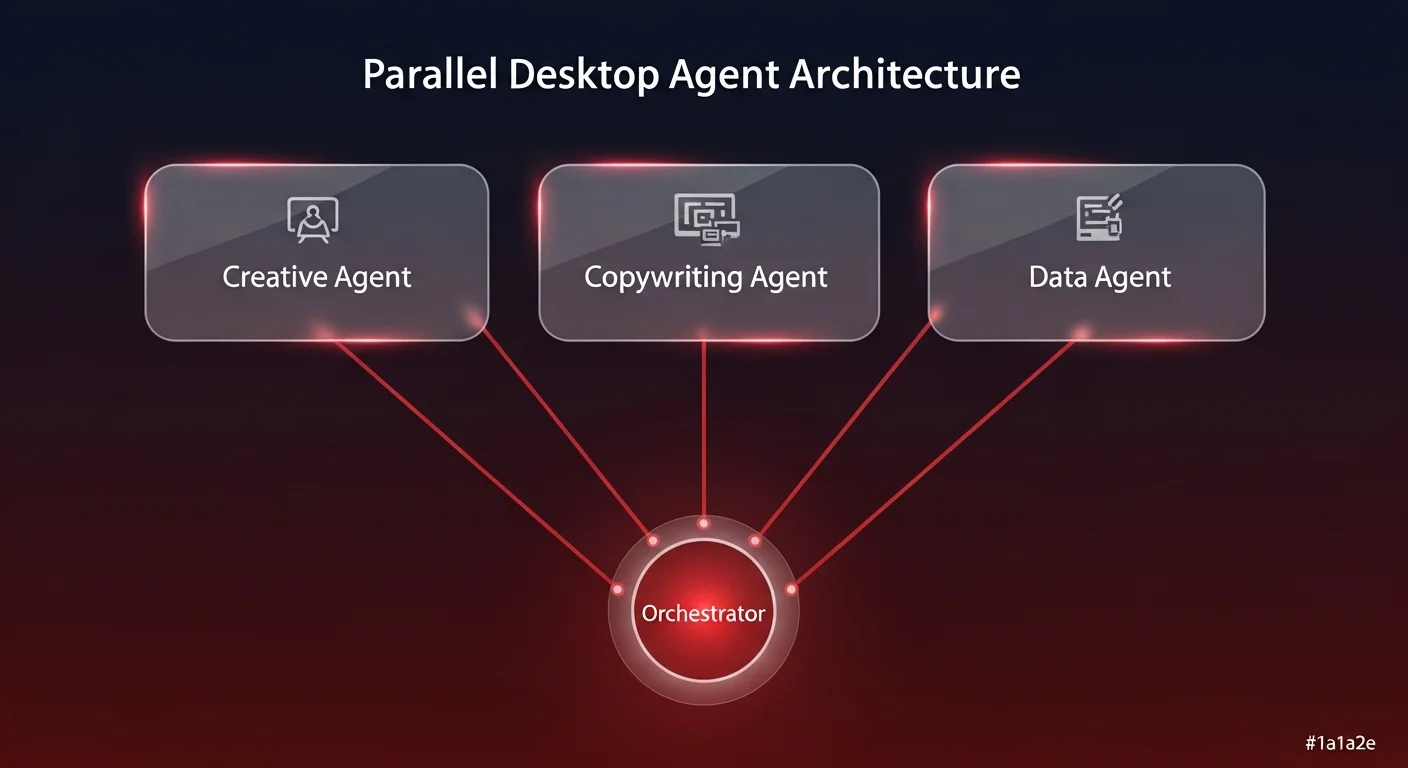
- Creative agent: Connects to an image generation tool to create three ad variations for every product in the folder.
- Copywriting agent: Researches the product specs and writes descriptions and ad copy tailored to specific demographics.
- Data agent: Updates the master spreadsheet with the file paths of the new images and the status of the copy generation.
In the research we reviewed, this process reduced what would be hours of manual coordination into a ten-minute autonomous cycle. The agent even generates its own "to-do list" and progress tracker, checking off items as the sub-agents complete their work.
This is a micro-cosm of what Ability.ai advocates for at the enterprise level — specialized autonomous AI agents working in concert to achieve a business outcome. However, when this happens locally on a desktop, it creates a "black box" of productivity. If the logic used to generate those ad variations is flawed, or if the spreadsheet update fails silently, there is no centralized log to audit. The efficiency is high, but the observability is near zero.
Deep repository analysis and data sovereignty
Beyond creating new assets, desktop agents are proving exceptionally capable at analyzing massive repositories of local data. This solves a common privacy and security concern: uploading sensitive internal documents to a public cloud chat interface.
With local execution, an agent can be pointed at a folder containing, for instance, 50 podcast transcripts or a year's worth of customer support logs. Because the agent has access to the entire repository, it can perform meta-analysis that simply isn't possible in a standard chat context window.
We have seen workflows where an agent ingests dozens of transcripts to identify top-mentioned growth frameworks, creates a visual dashboard summarizing the data, and then authors a strategic playbook based on those findings. All of this happens without the files leaving the local environment's scope of access.
For the individual user, this is a triumph of data privacy - the same principle that drives local AI agents toward sovereign execution over cloud chat. They get the insights without the upload risk. However, for the organization, this creates a data sovereignty paradox. Valuable business intelligence is being generated and stored on local devices, often disconnected from the company's central knowledge management systems. If an employee builds a brilliant churn-risk dashboard on their laptop using this method, that asset effectively disappears when they close their computer.
The rise of shadow plugins and unverified logic
The most strategically significant development in this space is the concept of "Plugins" or packaged skills. Users can now bundle their custom instructions, prompt chains, and tool connections (such as the Model Context Protocol or MCP) into shareable files.
Imagine a marketing lead who figures out the perfect workflow for an SEO audit. They can connect Claude to a browser via MCP, script a workflow that visits a competitor's site, scrapes the headers, checks for specific keywords, and formats a report. They can then "package" this entire workflow - the prompt, the tool connection, and the output format - into a zip file or a plugin.
This plugin can be emailed to other team members, who can install it and run the exact same logic. On the surface, this looks like standardization. In reality, it is the genesis of Shadow AI - a risk pattern that quietly undermines enterprise governance and manager oversight.
Here is why this matters to the COO:
- Version control: If the marketing lead updates the audit logic, how do they ensure everyone installs the new plugin? Likely, they can't. You end up with five different versions of "standard" work.
- Security risks: Employees may download plugins from GitHub marketplaces or external communities that contain unverified code or prompt injections.
- Dependency chains: If a critical business process relies on a plugin that runs locally on one person's machine, that process is fragile. It is not an operational system; it is a personal productivity hack.
Integrating the browser: the final frontier of local context
The integration of MCP (Model Context Protocol) allows these desktop agents to reach outside the file system and interact with the web browser. This capability transforms the agent from a file processor into a research assistant.
We have analyzed workflows where an agent is tasked with tracking search engine result pages (SERPs) for specific keywords. The agent opens a browser instance, runs live Google searches, parses the results to identify competitors, and logs the data into a spreadsheet. It creates a real-time loop between the web, the AI model, and the local file system.
While impressive, this highlights the limitations of local execution. A browser automation task running on a laptop is subject to that laptop's internet connection, power state, and the user's active session. It is powerful for ad-hoc research but entirely unsuitable for mission-critical monitoring. To make this operational, this logic needs to be lifted from the desktop and deployed in a governed, server-side environment where it can run 24/7 without user intervention.
Governing desktop AI agents: strategic implications for your workforce
The technology demonstrated by these desktop tools validates a core thesis: the future of work is not about better chatbots, but about agents that can plan, execute, and use tools to deliver outcomes. However, relying on desktop-based agents to drive business processes is a strategy fraught with risk.
To harness this power without incurring the "Shadow AI" debt, operations leaders must adopt a new framework. As explored in our guide on AI governance as a CEO responsibility, the principles are the same whether the agents run on a laptop or a server:
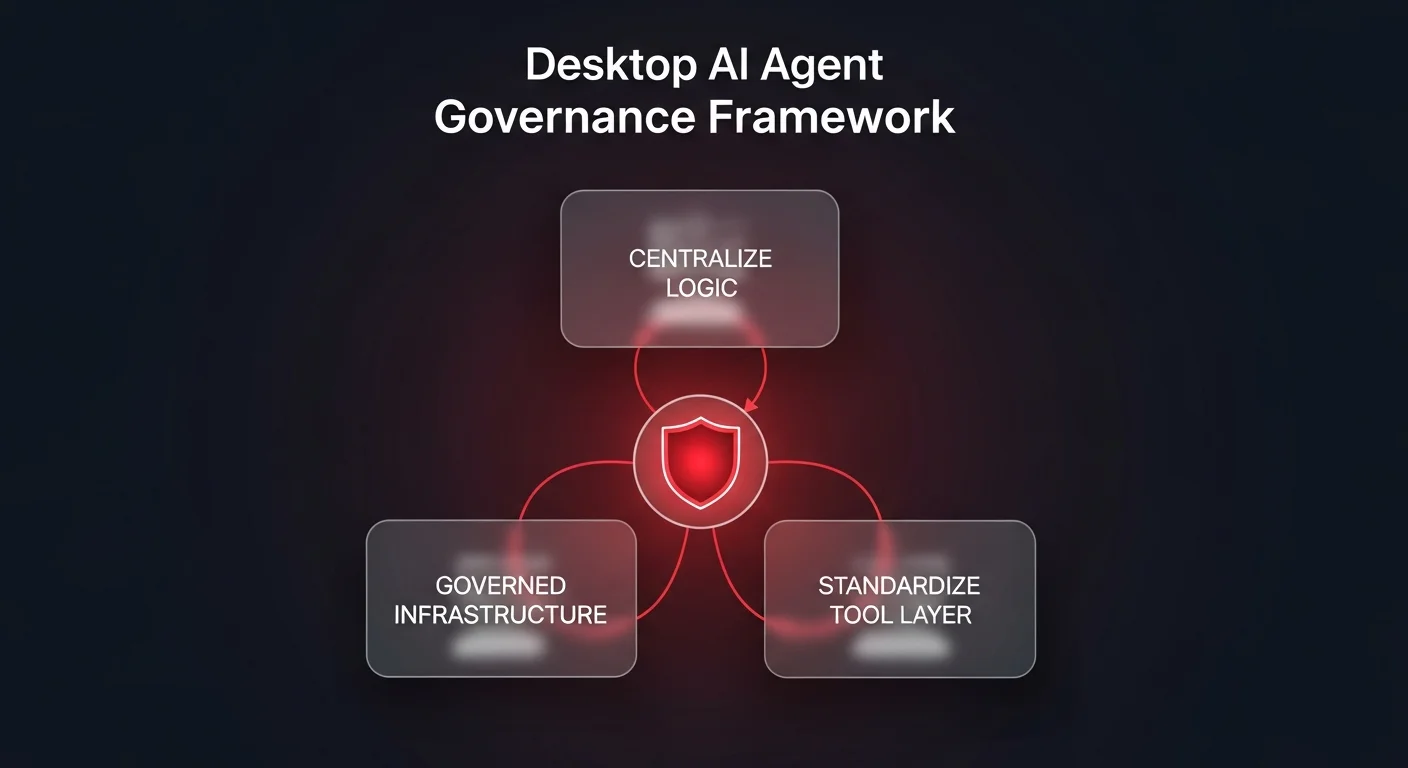
1. Centralize the logic, distribute the access
The workflows described above - generating strategy decks, analyzing repositories, auditing websites - are valuable. But the logic defining how they are done should not live in a zip file on an employee's desktop. Organizations need a centralized infrastructure where these agent definitions are stored, versioned, and managed — a key pillar of scalable operations automation. This ensures that when the "SEO Audit" agent is updated, every user accesses the latest version immediately.
2. Move from local execution to governed infrastructure
While local "Co-work" is great for drafting, finalized business processes should execute on governed infrastructure. This provides observability - you can see exactly what the agent did, what data it accessed, and what the output was. It ensures that if an employee leaves, the agent that runs their weekly reports doesn't leave with them.
3. Standardize the tool layer
The use of MCP to connect tools is a breakthrough, but allowing every employee to configure their own tool connections creates a security nightmare. API keys, access tokens, and permission sets need to be managed centrally. An operational AI platform should handle the authentication and connection to tools like CRMs, databases, and browsers, ensuring that agents only access what they are authorized to touch.
The path forward
Tools like Claude Desktop and its Co-work mode are giving us a preview of the future. They show us that AI can handle complex, multi-step, file-heavy workflows. They prove that parallel agents can dramatically reduce cycle times.
The challenge for leadership is to take these individual superpowers and turn them into organizational capabilities. The goal is not to stop employees from using these powerful local tools, but to identify the winning workflows they create and migrate them into a governed, scalable environment. That is how you transform a collection of productive individuals into an AI-enabled enterprise.