
An AI video production workflow is a structured, multi-step process that chains image generation, storyboarding, and motion animation tools to produce brand-quality video content in days instead of months. When PJ Ace's team used this approach for a David Beckham IM8 advertisement, it generated 233 million views in 3 days — at a fraction of traditional production costs — demonstrating that enterprise-grade AI video requires operational discipline, not just access to AI tools.
However, the gap between a viral hit and the "AI slop" that damages brand reputation lies entirely in the operational process. As we analyze the workflow used by top creators, it becomes clear that enterprise-grade AI video is not about typing a magic prompt into a text-to-video generator. It is a complex orchestration of assets, reference images, and motion control tools.
For mid-market companies looking to scale their creative output, understanding this workflow is no longer optional. It represents a shift from creative intuition to operational engineering, where the competitive advantage goes to those who can manage the "supply chain" of digital assets most effectively across a fragmented stack of AI tools.
The shift from text-to-video to ingredients-to-video
The most common misconception among business leaders is that AI video creation is a "text-to-video" process. You type a script, and a model generates a finished scene. According to PJ Ace, often called the "Don Draper of AI ads," this approach is a dead end for professional work.
To achieve brand-safe, consistent results, you must adopt an "ingredients-to-video" mindset. In this model, the AI video generator (like Runway or Kling) is merely the final assembly line. The quality is determined by the raw materials - the ingredients - you feed into it before the generation button is ever pressed.
In the traditional method, a director controls the set, lighting, and actors physically. In the AI workflow, control is established through image generation and storyboarding before motion is applied. If you attempt to generate video directly from text, you lose control over character consistency, lighting continuity, and brand aesthetics. The AI model hallucinates details to fill in the gaps of your prompt.
By supplying the model with specific "ingredients" - character reference sheets, depth maps, and exact composition frames - you constrain the AI's randomness. This transforms the tool from a slot machine into a precise rendering engine. For operations leaders, this distinction is critical: you cannot automate video production without first standardizing the creation of these ingredients.
The technical workflow: orchestrating the stack
The workflow behind the viral IM8 and Kalshi ads reveals a fragmented but highly effective stack of tools. This is not a single software solution but a chain of specialized agents and applications. Here is the operational breakdown of the process.
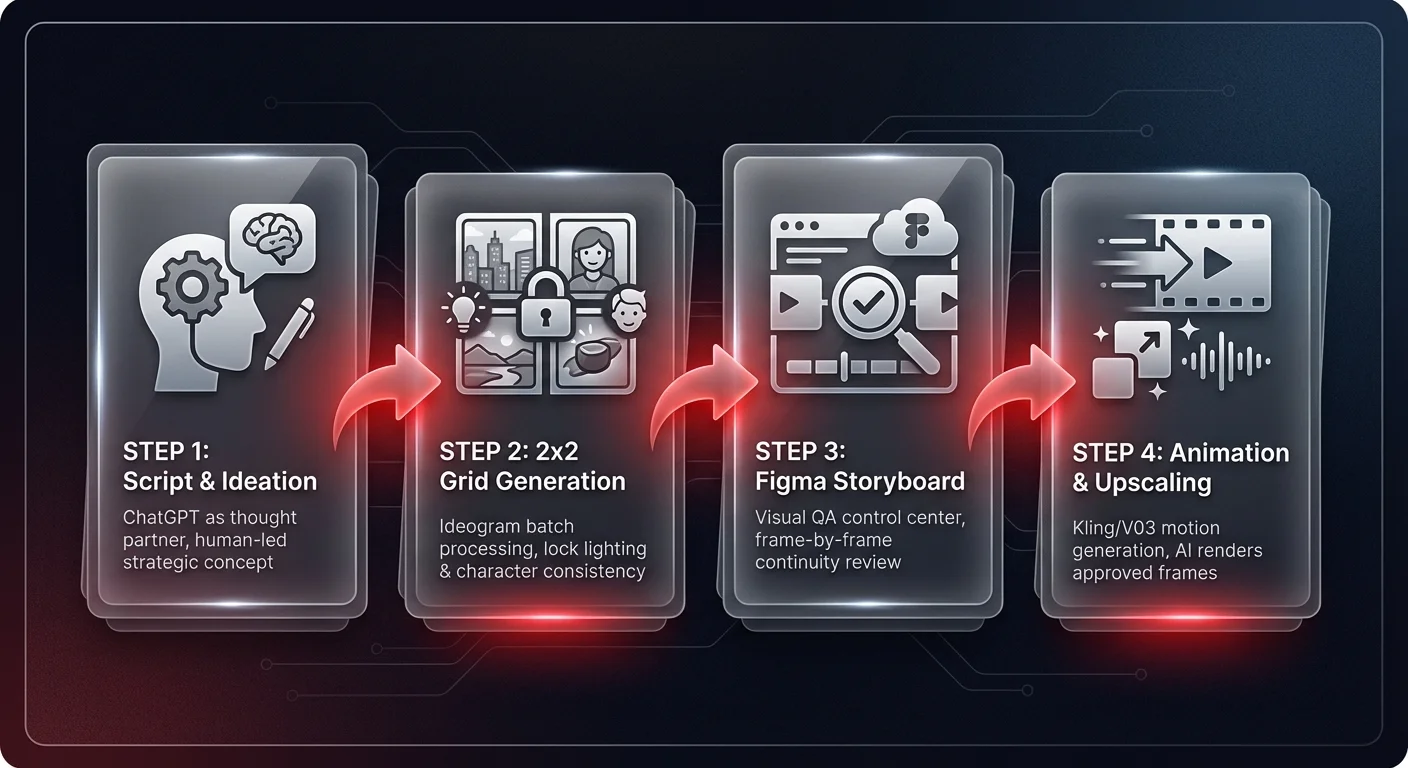
Step 1: script and visual ideation
The process begins with the concept. While tools like ChatGPT act as a "thought partner" for scripting, the human element remains essential for the core idea. For the Kalshi NBA Finals ad, the concept was a culturally relevant "love letter to Florida," featuring specific regional archetypes like the "Miami Club old man" and "swamp characters." AI can draft the dialogue, but the strategic direction must be human-led to ensure it resonates with the target audience.
Step 2: consistency via the 2x2 grid hack
One of the biggest operational challenges in AI video is consistency. How do you ensure the character in Shot A looks like the same person in Shot B? PJ Ace utilizes a specific technique using image generators like Ideogram or Google's Imagen.
Instead of prompting individual images, the team prompts for a "2x2 grid shot" or a sequence sheet within a single generation. For example, the prompt might request "Link jumping over a bridge at sunset, 2x2 grid." This forces the model to generate four variations of the same scene under the exact same lighting conditions and artistic style simultaneously.
From an operational perspective, this is a batch processing efficiency. By generating scenes in a grid, you lock in the "state" of the lighting and character model. These grids are then cropped into individual images and upscaled. These upscaled images become the "key frames" that ensure visual continuity across different cuts.
Step 3: the storyboard as a control center
Once the key frames are generated, they are moved into a design tool like Figma. This serves as the visual storyboard where the director arranges the flow of the narrative. This step is crucial for governance. Before any expensive video generation compute is used, the team can review the visual narrative frame-by-frame.
In Figma, the team arranges the cropped images from the 2x2 grids. They check for continuity: Does the reverse shot match the lighting of the close-up? Does the character's attire remain consistent? This static review process saves countless hours of wasted rendering time. It effectively acts as a quality assurance layer in the production pipeline.
Step 4: animation and upscaling
Only after the static images are approved do they move to the animation phase using tools like V03 or Kling. Because the input is a high-resolution image (an ingredient) rather than just text, the video model's job is simplified to just "moving" the pixels that are already there, rather than inventing new ones. This dramatically reduces hallucinations and ensures the final video matches the approved storyboard.
AI remote production: motion control and performance transfer
The workflow is evolving rapidly with the introduction of motion control features, specifically in tools like Kling 2.6. This technology introduces "performance transfer," which allows a human actor's video performance to drive an AI-generated character.
In this workflow, an actor records a video on a smartphone - acting out a scene, delivering dialogue, or performing a stunt. This video is uploaded alongside a reference image of the desired character (e.g., a sci-fi soldier or a stylized animation). The AI then maps the human's micro-expressions and body movements onto the generated character.
This has profound implications for production logistics:
- Cast consolidation: A single actor can play every role in a production. As seen in examples provided by PJ Ace, one person can drive the performance for a drummer, a guitarist, and a singer in the same band, simply by swapping the target character image.
- Remote direction: Directors no longer need actors on a physical soundstage. A performance can be recorded remotely, and the "costume" and "set" are applied post-hoc via AI.
- Asset longevity: An actor's performance becomes a reusable digital asset. The same acting take could theoretically be used to drive a character in a commercial for the US market and a completely different localized character for the Asian market, without reshooting the scene.
Operationalizing the team structure
A dangerous myth in the AI space is the concept of the "army of one" - the idea that a single person with a laptop can replace an entire agency. While possible for hobbyists, enterprise-quality output still requires a specialized team structure. The tools change the efficiency, but they do not eliminate the need for domain expertise.
The ideal AI video unit mirrors a traditional animation pipeline:
- Writer: Focuses on scripts and prompt engineering for narrative.
- Director: Oversees the Figma storyboard and visual coherence.
- Cinematographer: Specializes in lighting prompts and camera angle inputs.
- Animator: Handles the motion control and video generation tools.
- Editor: Stitches the final assets together in traditional non-linear editing software (Premiere/Davinci).
The efficiency gain is not in eliminating these roles, but in the speed of execution. A project that traditionally took months and cost $300,000+ can now be executed in days for $10,000 to $30,000. This 10x reduction in cost and time allows mid-market companies to compete with Fortune 500 advertising budgets — a capability we've seen documented in Ability AI's AI content system case study, where structured production pipelines dramatically compressed creative output cycles.
Strategic risks: the incumbent vs. challenger dynamic
Not every organization should rush to implement these workflows immediately. There is a distinct divergence in risk profiles between "incumbent" brands and "challenger" brands.
Incumbents (like Coca-Cola or McDonald's) face high scrutiny. When they deploy AI-generated content, they risk backlash for using "AI slop" if the quality isn't perfect, or for seemingly abandoning human artistry. Their brand equity is "sacred," making the margin for error incredibly slim. We have already seen major brands pull AI campaigns due to negative public sentiment.
Challenger brands (like Kalshi or IM8), however, thrive on speed and cultural relevance. They do not have decades of sacred brand heritage to protect. For these companies, the ability to produce a high-quality ad reacting to the NBA Finals matchups just two days before the game is a massive competitive advantage. They can move faster than the news cycle, whereas an incumbent's approval process alone would take longer than the entire production window of an AI ad.
The governance gap in creative operations
The workflow described by PJ Ace highlights a significant operational challenge: tool fragmentation. The production process involves moving assets manually between ChatGPT, Ideogram, upscalers, Figma, Kling, and editing software. This "swivel-chair" integration creates friction and introduces data governance risks.
As organizations scale this capability, they will face issues with:
- Asset management: Keeping track of thousands of generation iterations.
- Version control: Ensuring the approved storyboard frame is the one used for generation.
- Brand safety: ensuring that no unauthorized reference images or intellectual property are fed into public models.
The future of this workflow lies not just in better video models, but in the orchestration layer — governed agents that can handle the file movement, consistency checks, and metadata tagging automatically, much like the operations automation systems Ability AI deploys for content-heavy enterprises. This will allow creative teams to focus on directing the output rather than managing the files.
AI remote production workflows
The performance transfer capabilities described above have unlocked a new paradigm: fully remote AI video production. Directors no longer need actors on a physical soundstage or access to expensive studio equipment. A creative director in London can direct a performer in Tokyo via video call, capture the performance on a smartphone, and apply any character, costume, or environment in post-production using AI tools like Kling 2.6.
For enterprise teams managing global campaigns, this eliminates the logistics of multi-location shoots. A single performance capture session can be repurposed across markets — the same acting take drives a character tailored for the US audience and a completely different localized character for European or Asian markets, without reshooting. Remote collaboration tools like Figma storyboards and shared asset libraries ensure that distributed teams maintain visual consistency across dozens of generated scenes.
The operational advantage is clear: companies that master remote AI video production can produce content at the speed of culture rather than the speed of traditional production schedules. This is particularly powerful for challenger brands competing against incumbents with larger budgets but slower approval processes.
Conclusion
The "David Beckham AI Workflow" proves that AI video is ready for prime time, but only for those willing to respect the complexity of the process. It is not a magic button; it is a new form of digital manufacturing. For operations leaders, the task is to build the infrastructure that supports this workflow - securing the tools, structuring the teams, and governing the data - to turn creative experiments into a reliable engine for business growth.