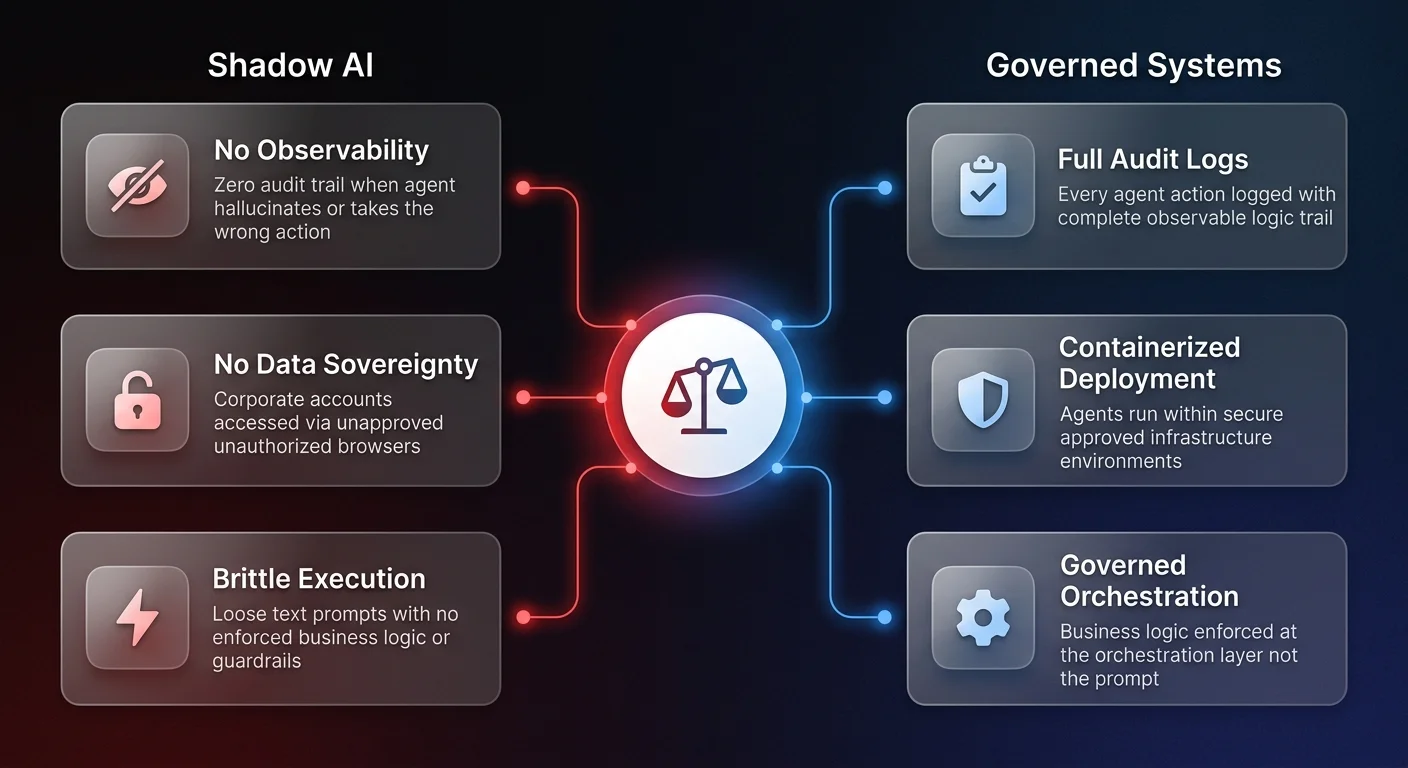

Claude computer use is an AI capability that grants language models direct control over desktop interfaces - viewing screens, moving cursors, and executing keystrokes without requiring traditional API access. As of 2026, unsanctioned use of this technology by employees represents one of the fastest-growing shadow AI risks inside scaling companies, with zero observability and no data sovereignty controls.
The release of Claude computer use represents a fundamental shift in how businesses approach automation. By granting an AI model direct access to view a screen, control a mouse, and execute keyboard commands, Anthropic has effectively bypassed the traditional limitations of API-based integrations.
For operations leaders, this capability presents a profound dual reality. On one hand, it unlocks the ability to automate highly complex, historically manual tasks across legacy systems and closed platforms. On the other hand, it has inadvertently triggered a massive new wave of shadow AI - one where employees are actively bypassing built-in security guardrails to run unsanctioned, unobservable automated workflows on company hardware.
Recent industry testing and field observations reveal exactly how users are deploying these desktop agents to execute economically valuable tasks, and more importantly, how they are hacking their way around enterprise safety protocols. For scaling companies, understanding these exploits is the first step toward transforming fragmented AI experiments into reliable, governed operational systems.
The shift from API limits to GUI automation
Historically, automation required strict API access. If an application did not have a public API, or if that API was heavily restricted, automating workflows within that platform was virtually impossible. This is particularly true for major social media networks and advertising platforms like LinkedIn, Instagram, Google Ads, and Meta. These platforms actively block the vast majority of traditional browser automation to maintain a human-centric environment and prevent bot activity.
Desktop AI agents change this paradigm entirely. By utilizing graphical user interface (GUI) interaction, the AI navigates the computer exactly like a human would. It visually reads the screen, moves the cursor, clicks specific coordinates, and types via keyboard simulation.
Because the interaction happens at the surface level of the operating system, it negates platform specific API restrictions. If a human can log in and click a button, the AI can be instructed to do the same. Industry testing shows that when fed the right prompt and a specific set of operating procedures, these agents can run constantly in the background, executing complex knowledge work on autopilot.
However, this powerful capability comes with significant security restrictions intentionally built by AI developers - restrictions that the market is already learning to circumvent.
How Claude computer use bypasses built-in AI guardrails
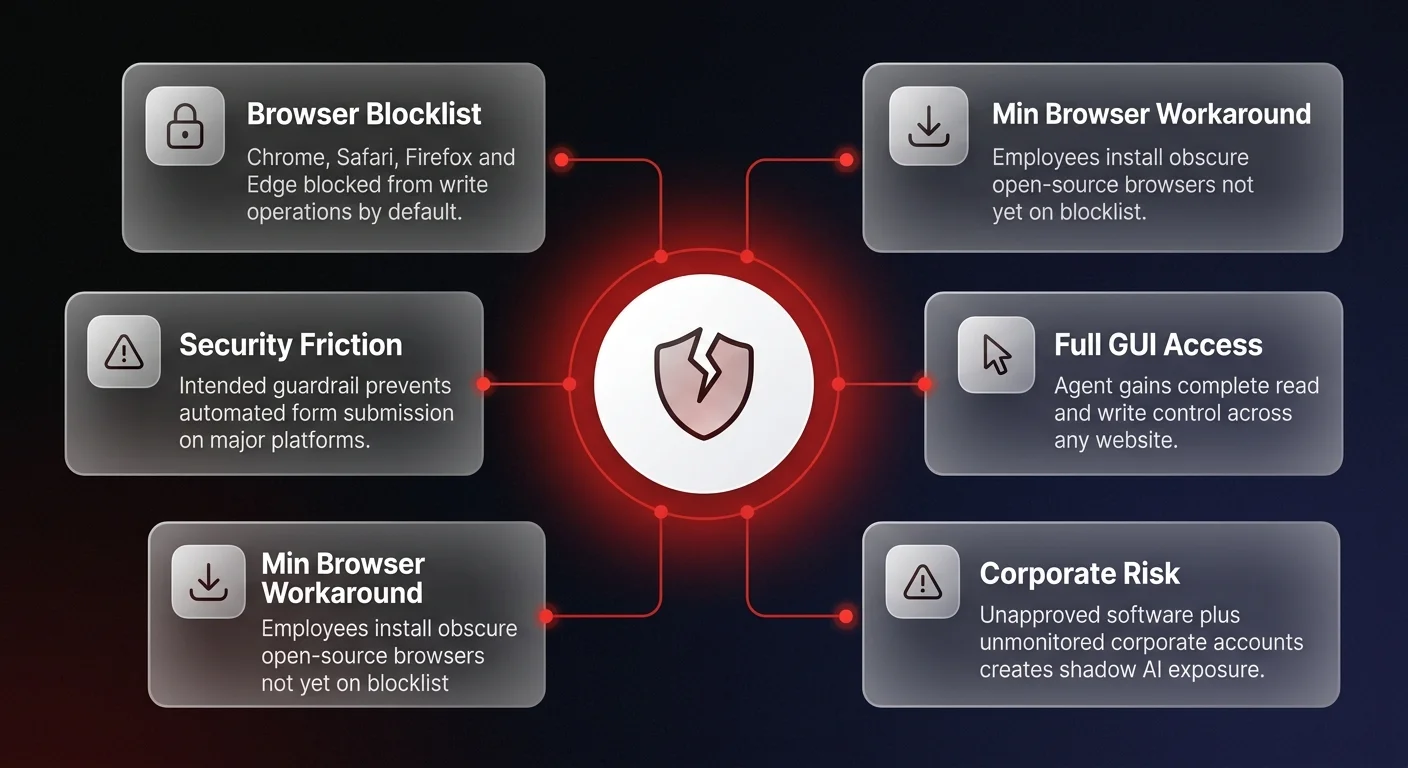
To prevent malicious automation, Anthropic built specific safety mechanisms into the Claude computer use feature. The most prominent is a strict read block on major web browsers. By default, the system automatically blocks the agent from executing incoming write commands - such as typing messages or submitting forms - on Chrome, Safari, Firefox, and Edge.
In a governed enterprise environment, this guardrail acts as a necessary friction point. But in the wild, users focused on rapid output have found a dangerously simple workaround: downloading obscure, unverified web browsers.
Research shows that users are actively installing secondary, lesser-known browsers - such as the open-source Min browser - simply because they are not yet included on Anthropic's blocklist. By launching the AI agent within these alternative browsers, users instantly gain full read and write access across any website.
From an operational and security standpoint, this is a nightmare scenario. Employees are downloading unapproved software, logging into corporate accounts or client environments on unmonitored browsers, and handing full control of the keyboard and mouse over to an autonomous agent. They are doing this to bypass the exact friction that keeps corporate data sovereign and secure.
This pattern mirrors the broader desktop AI agents governance crisis that operations leaders are confronting across industries - the tools delivering real efficiency gains are simultaneously creating new categories of unmanaged risk.
High-value workflows being automated offline
Despite the massive governance risks, the economic incentive driving employees to use these workarounds is substantial. The ability to execute physical clicks and navigate dynamic interfaces has unlocked highly valuable workflows that previously required human virtual assistants or expensive manual labor.
Observations of desktop agents in the field highlight several core areas where this technology is actively being deployed.
Scaling personalized outbound
Cold outreach on platforms like LinkedIn is notoriously difficult to scale due to strict automation limits. Using Claude computer use via unblocked browsers, users are entirely automating this process. The workflow typically involves instructing the agent to search a specific term, sort by people, and systematically send connection requests.
Crucially, the agent can dynamically inject variables into connection templates. For example, an agent can be instructed to use an icebreaker template, visually parse the prospect's profile, and inject a casual version of their company name and relevant interests. It executes this not via mass backend pinging, but by physically clicking the connect button and typing the message - making it incredibly difficult for the platform to flag as non-human activity.
Navigating gate-walled lead generation
A significant portion of B2B contact information is hidden behind gate-walled contact forms on local business websites. Traditional scrapers fail here because forms often feature dynamic UI elements, such as complex date pickers, dropdowns, or CAPTCHA-like friction.
Desktop agents bypass this by visually processing the page. In testing scenarios involving local dental clinics, the agent successfully closed intrusive chat widgets, identified input fields like first name and last name, successfully navigated complex birth-date pickers by executing multiple localized clicks, and submitted the lead form. It works top to bottom, adapting to whatever layout the specific local business website uses.
Optimizing ad spend without API access
Perhaps the most economically sensitive use case observed is the management of digital advertising platforms. Meta and Google heavily restrict API access to prevent automated fleets from manipulating ad auctions.
Users are bypassing this by deploying desktop agents directly into the ads manager dashboard. By providing the AI with a strict standard operating procedure (SOP), the agent can be instructed to visually locate new patient video ads, switch to the inside view to analyze the cost-per-lead, and physically click the toggle to disable the lowest performing campaigns. In agencies generating 8x to 10x ROAS for clients, offloading campaign optimization to an agent running on a local desktop introduces both massive efficiency and terrifying operational risk.
Performing visual QA testing
Traditional automated QA testing relies on running JavaScript to simulate click events. While functional, it does not truly replicate how a human user interacts with a visual interface.
Desktop agents are being utilized to stress test sign-up flows and web applications by acting as real users. The agent is instructed to go through an entire sign-up process, attempt to break the form using various validation approaches, and capture screenshots at every step. Because it physically clicks the actual visual buttons rather than pinging underlying code, it uncovers UI failures that traditional headless browsers miss.