
Desktop AI agents are autonomous AI systems moving from browser-isolated environments into native operating system execution—running PowerShell scripts, accessing enterprise file systems, and managing background automations with direct OS-level access that browser-based tools cannot replicate. This transition from cloud-hosted interfaces to native execution represents a fundamental shift in both capability and risk for operations leaders, and the governance decisions made in the next 12 months will define organizational security posture for years.
Recent industry developments highlight this trajectory perfectly. OpenAI's expansion of the Codex application to Windows serves as a bellwether for the broader AI market. By enabling native execution via PowerShell and providing deep integration with the Windows Subsystem for Linux (WSL), the industry is signaling that the future of enterprise AI lies in deep, OS-level integration.
For operations leaders, CEOs, and COOs, this evolution presents a dual-edged sword. On one side, it unlocks unprecedented potential for autonomous workflows. On the other, it introduces severe governance, security, and data sovereignty challenges that current IT policies are ill-equipped to handle.
The migration from browser to operating system
For the past two years, the enterprise AI experience has been defined by the browser. Employees interacted with chatbots, copy-pasting corporate data into external web applications. While this created a baseline of productivity, it also created massive data silos and operational friction.
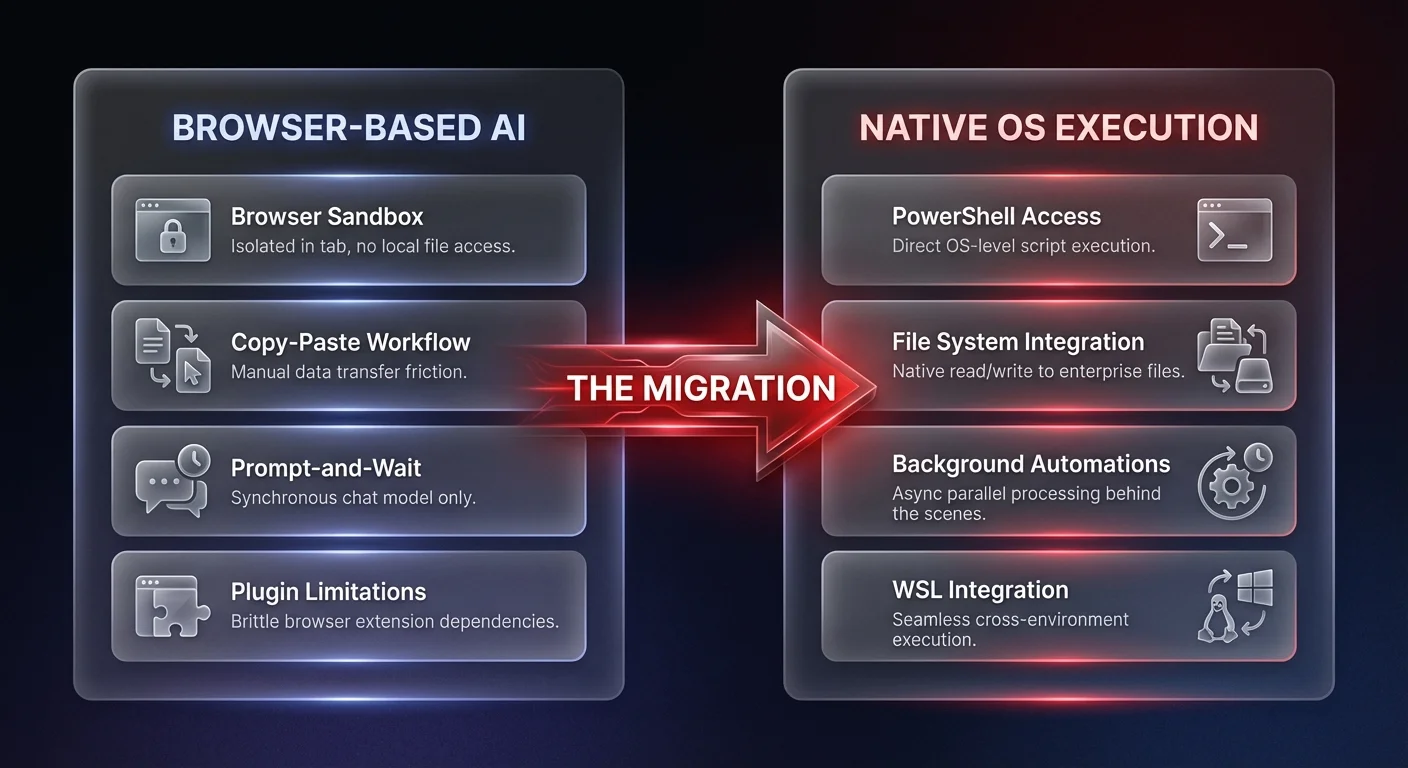
The release of native Windows AI applications changes this paradigm entirely. When an application like Codex runs natively using PowerShell, it bypasses the limitations of brittle browser plugins. It gains the ability to interact directly with the local file system, execute scripts, and manipulate local environments. Full support for the Windows Subsystem for Linux (WSL) means that these coding agents and integrated terminals can bridge multiple operating environments seamlessly.
This move to native OS execution confirms a strategic reality: serious automation requires deep systemic access. Browser-based AI tools are sufficient for basic drafting and summarization, but true operational transformation requires agents that can execute actions within the actual environment where work happens. However, granting AI models native access to enterprise machines fundamentally alters your corporate threat model. Before your organization moves in this direction, it is essential to understand the broader governance crisis already unfolding with desktop AI agents.
Parallel workflows and the rise of background execution
Perhaps the most significant signal from recent AI deployments is the shift from synchronous, chat-based interactions to asynchronous, autonomous execution. The introduction of features like "work trees" allows users to manage multiple independent tasks within the same project simultaneously.
This is a stark departure from the traditional prompt-and-wait model. Instead of an employee staring at a screen while an AI generates a response, work trees enable parallel processing. More importantly, the integration of background "automations" allows these systems to perform complex work entirely behind the scenes.
This shift validates the core thesis of autonomous operational systems. The goal of AI is not to be a better chat interface; it is to act as a reliable, invisible engine that drives business outcomes. For operations teams, the validation of background agents means we are moving closer to true autonomous execution. However, when AI operates behind the scenes, observability becomes paramount. If an agent is executing PowerShell scripts in the background, operations leaders must have clear, observable logic to understand exactly what decisions were made, why they were made, and what data was accessed.
Desktop AI agents and security sandboxing: the new enterprise baseline
With deep OS access comes immense security responsibility. The decision to run these new native AI tools inside a dedicated Windows sandbox highlights a critical priority for enterprise adoption — isolated execution environments.
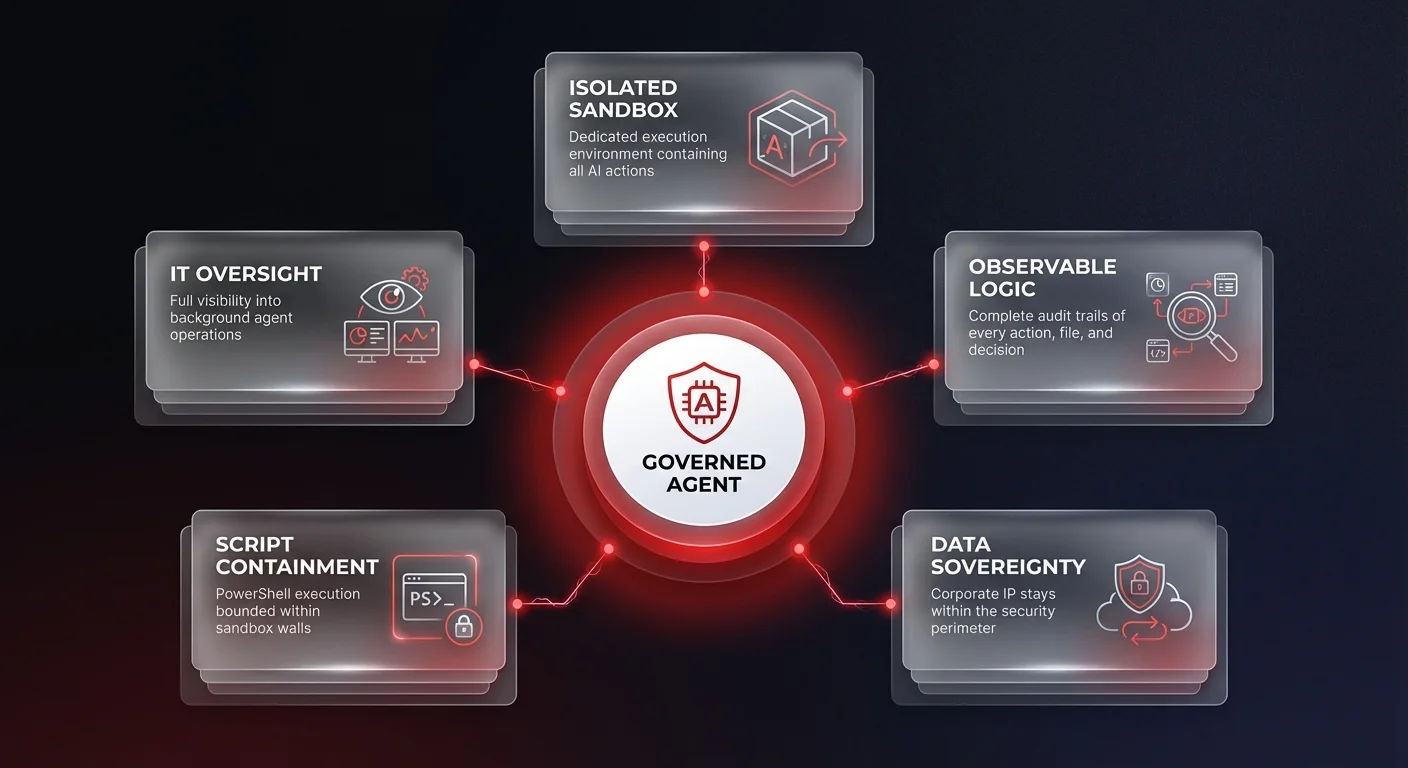
When you grant a desktop AI agent the ability to execute code natively, you are introducing a dynamic variable into your corporate infrastructure. Ungoverned desktop AI tools pose a massive threat, creating security nightmares through unmonitored script execution and potential data exfiltration. The dedicated sandbox approach acknowledges that AI cannot be given unfettered access to the host machine.
For a deep technical grounding in how sandboxing protects enterprise infrastructure, read our analysis of AI agent sandboxing and safety. For operations leaders, the governance imperative is clear: you cannot simply deploy native desktop agents across your workforce without robust containment strategies. Data sovereignty — ensuring your corporate knowledge remains secure and your execution environments remain isolated — must be the foundational requirement for any native AI deployment. Without isolated sandboxes, shadow AI transitions from a compliance headache to a critical infrastructure vulnerability.
Operators versus builders: closing the value gap
While native tools like Codex represent incredible advancements, it is crucial to recognize their target audience. These are tools designed for builders — developers and software engineers who need to write the underlying code of tomorrow's applications. Features like OS-specific skill galleries, such as dedicated WinUI capabilities, are built to help developers construct software faster.
But there is a vast difference between building software and running a company. Operations leaders — CEOs, COOs, and VPs of Operations — are not in the business of building bespoke AI agents. They are in the business of executing business processes, scaling revenue, and driving efficiency.
This highlights the growing build-versus-buy fatigue in the enterprise AI market. Equipping your engineering team with native coding agents is a massive productivity win, but expecting your operations team to piece together workflows using developer-centric tools is a recipe for operational fragmentation.
This is where the distinction between developer tools and sovereign AI agent systems becomes critical. While developers use tools to write code, operators need governed agent infrastructure that deploys specific business outcomes. Ability.ai recognizes that operations leaders need reliable, observable systems that transform fragmented AI experiments into governed operational realities, rather than just another toolkit requiring extensive internal development. Explore how Ability.ai's operations automation solutions help mid-market companies build governed native AI infrastructure built for security, observability, and scale.
Preparing your infrastructure for native execution
As native, OS-level AI execution becomes the standard, organizations must update their operational and security postures. The shift from browser to desktop requires a proactive approach to AI governance.
First, operations leaders must audit their current AI footprint. Identify where employees are attempting to use unauthorized tools to bridge the gap between their browser-based AI and their local files. This shadow AI activity is often a symptom of an unmet operational need — not a disciplinary issue.
Second, demand observable logic. If your organization is going to deploy agents that utilize work trees to execute background automations, you must have complete visibility into those processes. A black-box AI operating natively on a corporate machine is an unacceptable risk. You need systems that provide clear audit trails of every action taken, every file accessed, and every script executed.
Third, focus on data sovereignty. The use of dedicated sandboxes proves that isolation is necessary. Ensure that any AI system deployed within your organization operates within your security perimeter, protecting your intellectual property and customer data from leaking into public models.
The future of governed desktop AI operations
The transition of AI from a cloud-based assistant to a native, parallel-processing operational engine is inevitable. Features like dedicated sandboxing, native PowerShell execution, and background automations validate that the future of enterprise AI is autonomous, deeply integrated, and asynchronous.
However, the technology itself is only half the equation. The true challenge for mid-market and scaling companies is not accessing these capabilities, but governing them. To truly benefit from this technological shift, leaders must move beyond fragmented, ungoverned AI tools. By prioritizing data sovereignty, observable logic, and secure execution environments, organizations can transform these powerful new capabilities into reliable, governed operational systems that drive tangible business outcomes.
The organizations that win in this next phase of AI adoption will not be those who deploy the most desktop AI agents. They will be the ones who govern them most effectively. See how Ability.ai structures AI governance for enterprise IT and operations teams with the observability and control frameworks that native AI deployments demand.