
Desktop AI sales automations are multi-step, prompt-triggered workflows that connect AI desktop clients directly to CRM systems, scraping tools, and meeting transcribers to automate prospecting, pipeline management, and win-loss analysis. In 2026, sales teams deploying desktop AI sales automations are completing in minutes what once required hours of manual data entry — but the governance risks are just as significant as the productivity gains.
Desktop AI sales automations are rapidly shifting from simple text generation tools to complex, multi-step operational engines. Sales teams are no longer just asking AI to draft emails; they are deploying connected desktop skills that integrate directly with enterprise CRM systems, scraping tools, and meeting transcribers.
Our latest industry research reveals a fundamental shift in how go-to-market teams operate. Individual contributors are utilizing platforms like the Claude desktop app to build local, prompt-triggered automations — effectively creating their own personal operational systems.
While the productivity gains are staggering, this decentralized approach to AI introduces severe operational and security challenges for enterprise leaders. By understanding these five transformative sales workflows currently being deployed on local machines, operations leaders can better strategize how to centralize, govern, and deploy these capabilities securely at scale. As we detailed in desktop AI agents and the broader governance crisis, ungoverned desktop automations are quickly becoming one of the most significant risks facing mid-market companies.
The architecture of desktop AI sales automations
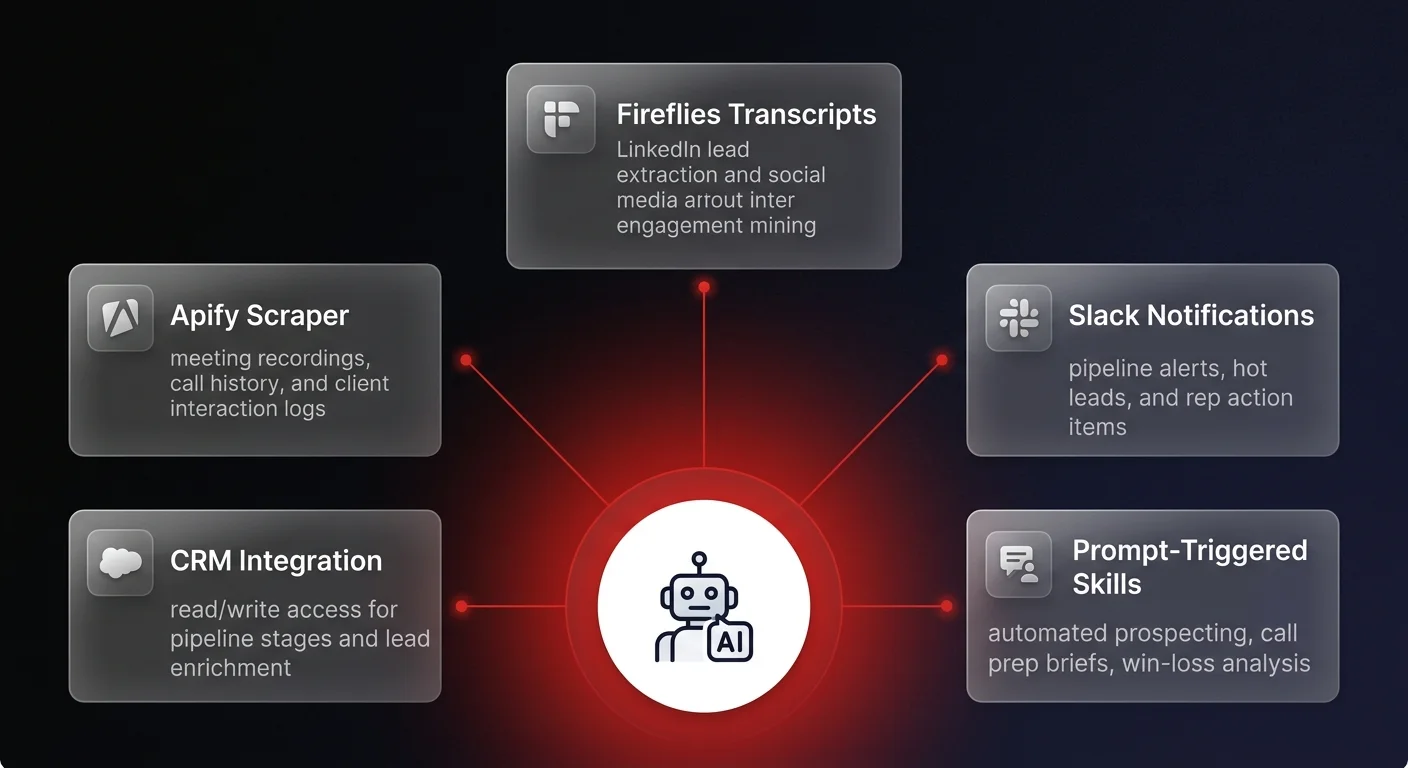
The fundamental unlock in current AI capabilities is the concept of "skills" combined with local computer access. Rather than operating in an isolated browser window, modern desktop AI applications connect directly to a user's local file system and broader software stack.
Sales professionals are integrating their local AI instances with powerful external APIs and platforms. By connecting tools like Apify for social media scraping, Fireflies for meeting transcription, Slack for notifications, and native CRM integrations, they are building complex workflows that execute entirely via natural language prompts.
Here are the five most impactful automations currently reshaping sales operations.
Workflow 1: automated pipeline prospecting and enrichment
Traditional prospecting requires sales development representatives to manually cross-reference social media engagement with lead databases and corporate criteria. Today, desktop AI agents execute this entire sequence autonomously.
In a standard automated workflow, a sales rep simply prompts their desktop AI with a specific LinkedIn post — perhaps one authored by a major industry influencer or a direct competitor. The AI triggers a designated skill that connects to a scraping marketplace like Apify. It extracts all the users who liked or commented on that specific post, deduplicating the list to find unique individuals.
However, data extraction is only the first step. The true operational value lies in automated qualification. The AI takes the raw list of engagers — sometimes hundreds of profiles — and cross-references them against the company's Ideal Customer Profile (ICP). It filters out irrelevant contacts and runs a secondary scrape to enrich the remaining qualified leads with deep organizational data, including company size, exact industry descriptions, and recent corporate news.
The final output is a clean, enriched CSV file of highly qualified prospects, ready for personalized outreach. What once took hours of manual data entry and cross-referencing is now executed in minutes through a single command.
Workflow 2: reviving closed-lost leads with parallel sub-agents
One of the most neglected segments of any sales pipeline is the "closed-lost" or unresponsive lead column. These records often contain valuable historical context but require too much manual research to effectively revive.
Advanced desktop AI automations are now being used for deep CRM prospect mining. A user can prompt their AI to scan a specific column in the CRM, pulling perhaps 150 to 200 dormant records.
Crucially, processing this volume of data typically overwhelms a standard Large Language Model context window. To bypass this limitation, modern desktop AI systems deploy "sub-agents." The primary AI delegates the workload, spinning up parallel sub-agents and assigning 15 to 20 leads to each.
These sub-agents operate simultaneously. They scrape the current LinkedIn profiles of the lost leads to identify job changes or company shifts, analyze the entire history of past email threads to understand why the deal stalled, and prioritize the accounts based on new qualification criteria. The system then compiles a prioritized list with a communication summary for each lead, effectively generating a highly targeted follow-up campaign out of dormant data.
Workflow 3: scheduled call preparation briefs
The introduction of scheduled tasks within desktop AI clients has moved these tools from reactive assistants to proactive operational systems.
Sales representatives are configuring their local AI to run specific workflows automatically at set intervals — for example, every morning at 7:00 AM. When the automation triggers, the AI checks the rep's daily calendar and cross-references the upcoming meetings with the CRM.
For every scheduled discovery or demo call, the AI agent searches through past email communications, previous meeting transcripts stored in tools like Fireflies, and public web data about the prospect's company. It synthesizes this disparate data into a comprehensive HTML briefing dashboard.
By the time the sales rep logs on for the day, they have a fully formatted document for every call featuring an account snapshot, a timeline of past interaction history, a suggested meeting agenda, and customized discovery questions tailored to the prospect's specific business model.
Workflow 4: comprehensive win-loss and rep analytics
Historically, rigorous win-loss analysis and sales rep performance grading required dedicated revenue operations personnel or expensive third-party consultants. Desktop AI automations are now performing these analyses on demand.
By feeding the AI agent access to both the "won" and "lost" columns of a CRM, along with the corresponding email histories and call transcripts, the system can generate incredibly comprehensive strategy documents.
These automated reports identify common objection patterns, calculate win rates across different pricing tiers, and flag early disqualification signals that reps frequently miss. It highlights exactly why won deals succeeded — such as specific engagement depth or product outcomes discussed — and provides a stark analysis of why lost deals failed.
Furthermore, these tools are being used to generate automated performance scorecards for individual sales reps. The AI evaluates a rep's transcripts and grades them across distinct pipeline stages: discovery, demo execution, objection handling, and pricing negotiation. The output includes top strengths, critical improvement areas, and a targeted coaching plan, all generated without managerial intervention.
Workflow 5: automated pipeline review and hygiene
Pipeline hygiene — the act of keeping CRM data accurate and up to date — is universally recognized as one of the biggest pain points for both sales representatives and revenue operations leaders.
Desktop AI skills are now being deployed to act as autonomous pipeline managers. By analyzing a rep's email outbox, Slack communications, and recent call transcripts, the AI can deduce the actual reality of a deal, regardless of what the CRM currently says.
Users can prompt the AI to review their pipeline and send a direct message via Slack highlighting which leads require immediate attention, which deals are at risk of stalling based on communication velocity, and which accounts are "hot."
More importantly, because these desktop tools have read and write access via API connectors, they can be configured to automatically update CRM pipeline stages, log recent communications, and adjust close dates based on the context of the rep's recent interactions.
The shadow AI crisis: securing your sales data
While these five workflows represent a massive leap in individual productivity, examining them through an operational lens reveals a terrifying reality for enterprise data security.
Sales representatives are building incredibly complex, ungoverned integrations on their local machines. To execute a simple pipeline hygiene skill, an individual employee is granting a third-party desktop application direct API access to your company's CRM, the entirety of your corporate email server, and every recorded client meeting transcript.
This is the new frontier of Shadow AI. The operational logic exists solely on an individual's hard drive. If a top-performing rep leaves the company, their customized skills and workflows leave with them. Furthermore, the sensitive data regarding your proprietary sales motions, customer objections, and strategic pricing discussions is being piped through ungoverned local clients that bypass enterprise IT security protocols.
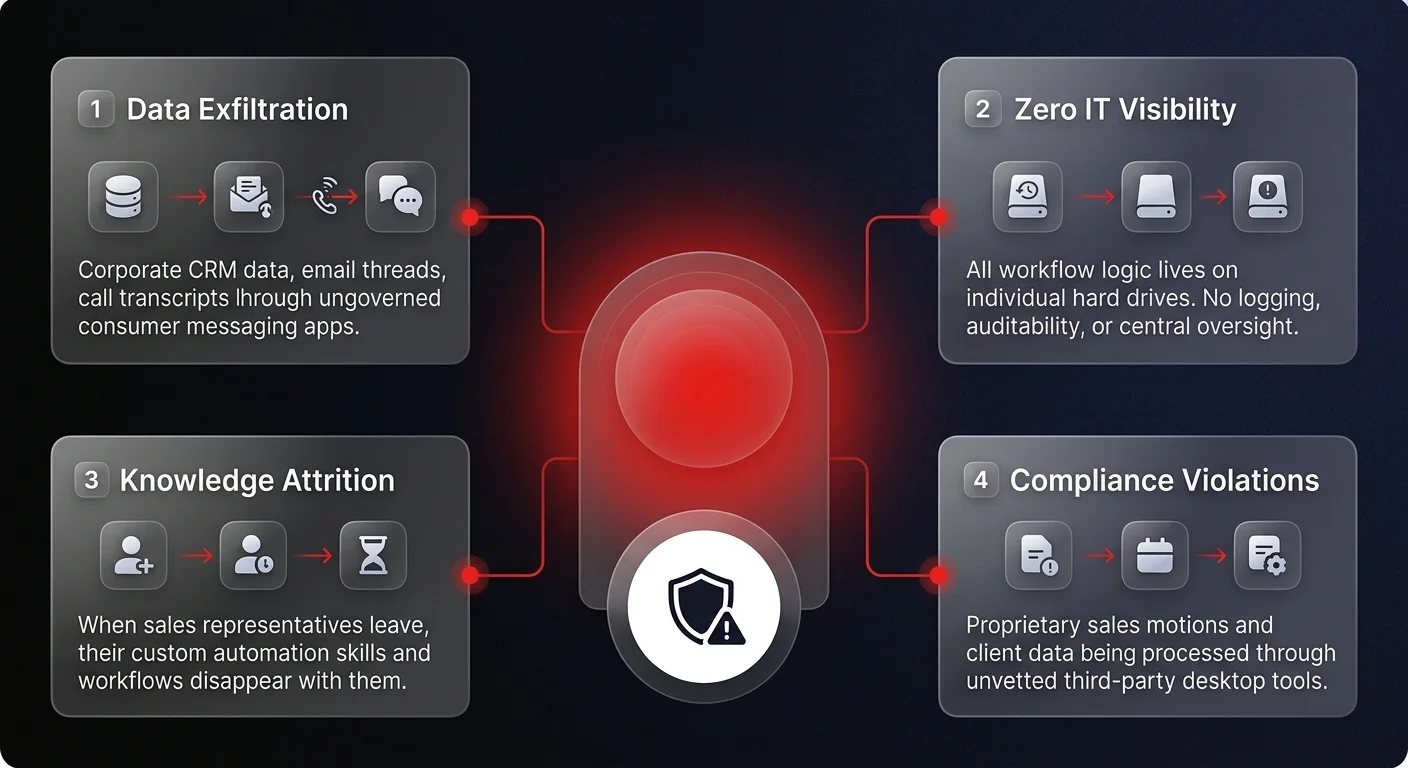
When individual contributors connect personal API keys to desktop AI applications to process corporate data, operations leaders lose all visibility, observability, and control over how company data is utilized. This problem extends well beyond sales — as we covered in shadow AI risks and the new governance crisis, it represents a threat that now requires CEO-level attention across every department.
Moving from desktop AI sales automations to governed operations
The solution is not to ban these automations. The efficiency gains provided by AI-driven prospect mining, automated call preps, and immediate win-loss analysis are too significant to ignore. Companies that prohibit these workflows will quickly be outpaced by competitors who leverage them to scale their go-to-market motions.
Instead, operations leaders must transition these fragmented, desktop-level experiments into reliable, governed operational systems. The goal is to provide the exact same capabilities to your sales team, but delivered through a secure, centralized infrastructure.
By deploying sovereign AI agent systems, organizations can centralize the logic that drives these sales workflows. A governed system ensures that API connections to your CRM and email servers are secure, managed, and observable. It ensures that the intelligence gleaned from win-loss analysis benefits the entire organization, not just the single rep who ran the prompt. Most importantly, it guarantees data sovereignty — ensuring your proprietary client data never leaks into ungoverned public models or resides unmonitored on local machines.
If your sales team is running ungoverned desktop automations today, our AI agents for marketing and sales teams practice can help you centralize and scale these workflows into governed infrastructure. For a broader view, see how enterprise AI agents are reshaping go-to-market operations at scale.
The future of sales operations is undoubtedly agentic. The companies that succeed will be those that successfully transform local desktop AI tricks into secure, scalable, and governed enterprise realities.