
Claude agent skills are modular, reusable instruction sets that encode business logic — SOPs, reference files, and guardrails — into reliable AI workflows that execute consistently at scale. At Ability.ai, we build and deploy these skills for mid-market companies daily, and skill engineering has become the most critical AI competency for operations leaders in 2026. The difference between a high-performing autonomous agent and a hallucinating chatbot often comes down to skill architecture — the structure of instructions, context files, and constraints that govern agent behavior.
Most organizations are currently stuck in a dichotomy of automation. On one side, they have rigid, deterministic automation platforms like n8n or Zapier, which are excellent for clear-cut data transfer but fail when judgment or nuance is required. On the other side, they have open chat interfaces or "Projects," where employees paste context repeatedly, leading to inconsistent outputs and data isolation. Agent skills sit squarely in the middle of this spectrum. They offer the flexibility of an LLM with the reliability of a coded software application. By structuring skills correctly, operations leaders can turn fragmented workflows into governed, shareable, and self-improving assets. For a deeper look at why single-agent approaches fall apart at scale, see our analysis of modular AI agent architecture.
Why chat and automation fail without agent skills
To understand why skill architecture matters, we must first look at where current tools fall short. Traditional automation is deterministic; if A happens, do B. This works for moving rows in a spreadsheet but fails for qualitative tasks like analyzing a sales call or drafting a strategic response. Conversely, standard AI chat interfaces are probabilistic and often lack memory of specific business constraints. They require the user to be the "guardrail," constantly prompting and correcting.
Skills bridge this gap by functioning as dynamic Standard Operating Procedures (SOPs). Unlike a "Project" or a custom GPT where context is often static and isolated to a single window, a skill is a modular capability that can be called upon by an agent when needed. It allows for human-in-the-loop (HITL) intervention without breaking the automation flow.
For example, a standard automation might fail if a client email doesn't match a specific keyword. A skilled agent, however, can parse the nuance, draft a response based on a "Tone of Voice" reference file, and present it to a human for approval via a checkbox or selection menu before sending. This combination of judgment and structure is the foundation of scalable AI operations.
The anatomy of a sovereign agent skill
Building a skill that outperforms 99% of standard prompting requires a specific architectural approach. It is not enough to simply write a long prompt. A robust skill structure mimics software engineering principles but replaces code with context and logic. There are three core components to this architecture:
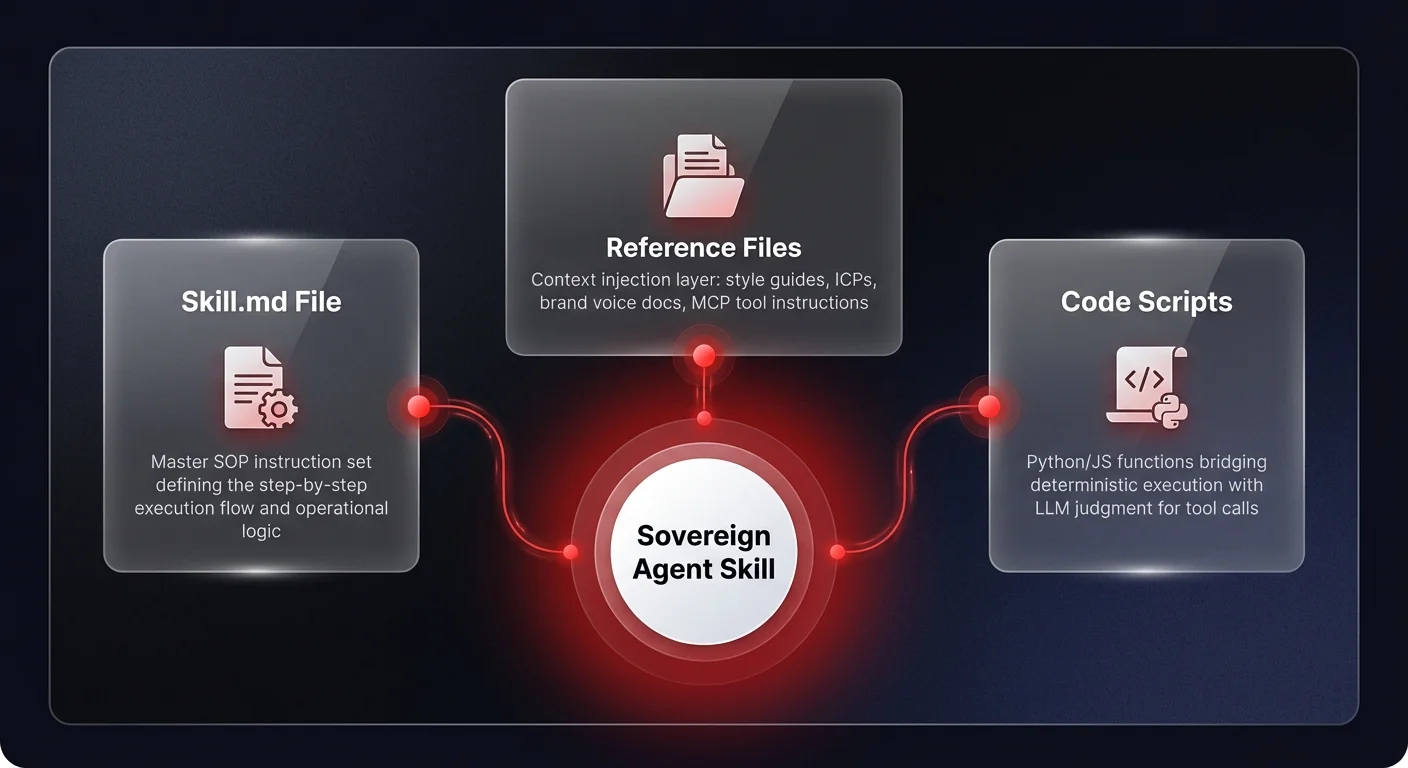
1. The skill.md file (the core SOP)
At the center of every skill is the skill.md file. Think of this as the master instruction set or the operational brain of the specific task. It outlines the execution flow step-by-step. For instance, in a "Sales Account Research" skill, the execution flow might look like this:
- Parse Request: Identify the target company and specific data points needed.
- Web Search: Execute a search for recent news and financial reports.
- Enrichment: Cross-reference findings with internal CRM data.
- CRM Check: Verify if the account already exists to avoid duplication.
This file focuses purely on the process. It dictates what to do, but it relies on reference files to understand how to do it according to company standards. Organizations already converting SOPs into agent instructions have seen dramatic efficiency gains, as we explored in our post on AI marketing teams and skills architecture.
2. Reference files and context injection
This is where generic agents become sovereign business assets. Reference files are the documents that ground the agent in your specific reality. These can include:
- Text files: Style guides, Ideal Customer Profiles (ICPs), historical content, or strategic backgrounders.
- Assets: Non-text files like image templates, presentation layouts, or even binary files that show the agent what a "good" output looks like visually.
- MCP instructions: Specialized instructions on how to use specific tools. For example, a document explaining exactly how to navigate your specific instance of Salesforce or HubSpot for a particular task.
In a real-world scenario, a "Newsletter Writer" skill wouldn't just be prompted to "write a newsletter." It would reference a voice_personality.md file, a previous_issues.md archive, and a strategic_goals.md document. This ensures that even if the agent model changes, the institutional knowledge remains anchored in your files, not the model's training data — a pattern at the core of our newsletter automation case study, where sovereign skill architecture reduced production time by over 80%. The key principle here is that structuring context for AI agents is what separates effective deployments from expensive experiments.
3. Code scripts and tool execution
Advanced skills can bridge the gap to software by including Python or JavaScript functions. An "Infographic Generator" skill, for example, might include a script to call a specific visualization API. This allows the agent to perform actions that are strictly deterministic (like generating a chart) while wrapping them in the judgment-based context of the agent (deciding which data to highlight).
Progressive disclosure: solving context overload in agent workflows
The biggest technical challenge in deploying enterprise agents is context window management. If you feed an agent every SOP, policy, and tool instruction in your company, it will become slow, expensive, and prone to confusion. The solution is a design pattern called progressive disclosure.
When you load skills into an agent environment, the agent should initially only see the metadata — the name of the skill and a brief description of what it does. For example:
- Name: infographic_generator
- Description: "Creates on-brand infographics for LinkedIn and newsletters based on provided text content."
Only when a user triggers this skill (e.g., "Make an infographic about this report") does the system load the heavy skill.md and necessary reference files into the active context window. This architecture allows a single agent to have access to thousands of potential skills without being weighed down by the data of all of them simultaneously. It is a critical efficiency mechanism for scaling operations from a single task to a departmental OS.
The self-improving loop: dynamic SOPs
One of the most powerful aspects of modern skill engineering is the ability to make agent workflows self-improving. Unlike static software that requires a developer to push an update, agent skills can be designed to update their own rules based on human feedback.
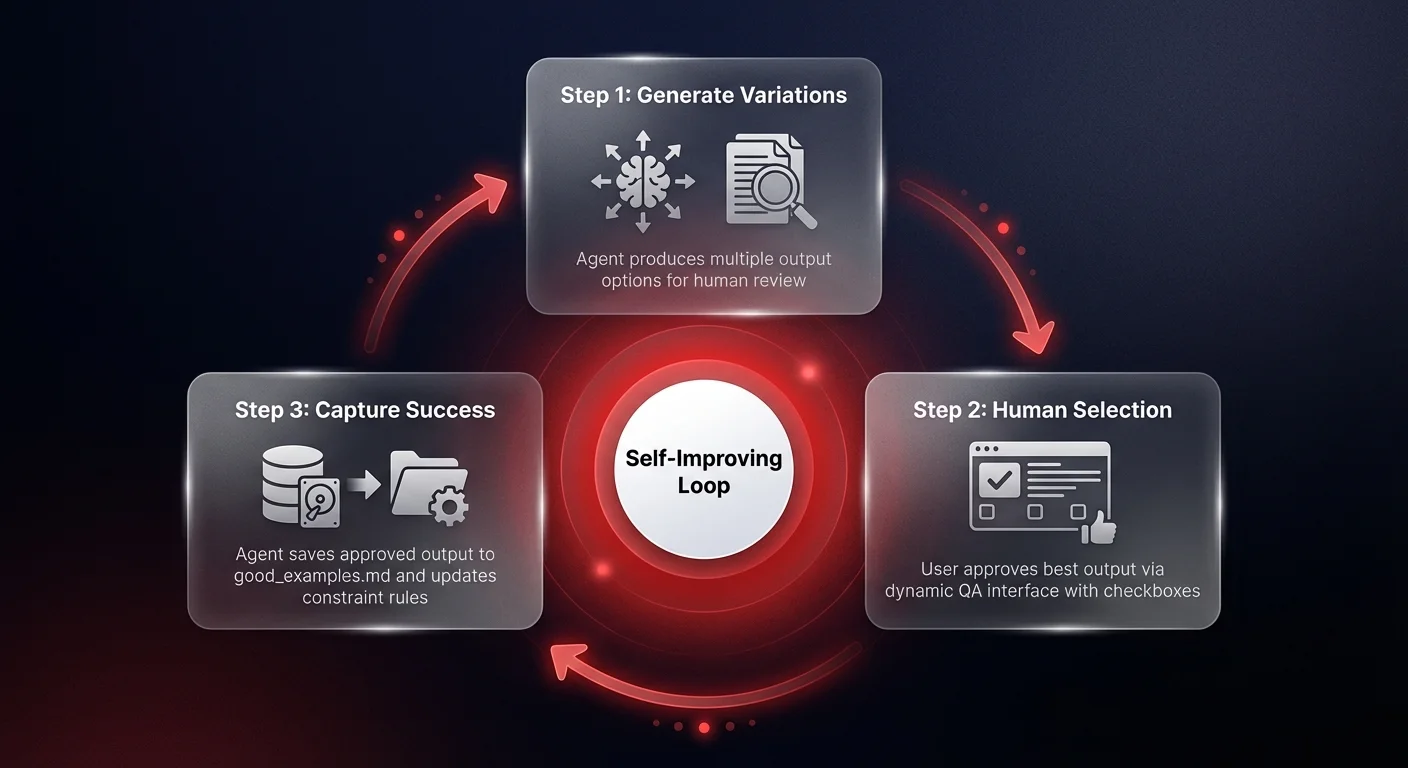
This is achieved through a specific feedback loop in the instruction set:
- Generate Variations: Instruct the agent to provide multiple options (e.g., "Give me five different visualization concepts for this data").
- Human Selection: The user selects the best option via a dynamic QA interface (checkboxes or radio buttons).
- Capture Success: The agent is instructed: "If the user approves the final outcome, save this output to the good_examples.md reference file."
Furthermore, you can implement a "Rules" section in your skill.md that governs constraints. If the agent makes a mistake — for instance, generating an image with a black background that obscures text — the user can correct it. The agent should then be instructed to update its own rules file: "Update the Rules section to explicitly forbid black backgrounds for this content type."
This transforms the agent from a passive tool into an active learner. Over time, the skill accumulates a library of approved examples and a robust list of "do not do" constraints, becoming more aligned with your specific business needs with every usage. This principle is central to why agentic workflows are replacing traditional SaaS interfaces across enterprise operations.
From individual agent skills to enterprise plugins
While individual skills are powerful, the strategic value for operations leaders lies in bundling these skills into Plugins. A plugin is essentially a software package for an organization department — a "Sales Plugin" or a "Marketing Plugin."
Plugins bundle together:
- Multiple related skills (e.g., Outreach Writer, Lead Researcher, CRM Updater)
- Commands that trigger complex workflows
- Specialized agent teams
- Preset connectors to software tools
This approach mirrors the software development lifecycle (SDLC) but for operations. A "Marketing Plugin" can be versioned, updated, and distributed to every employee in the marketing department. If the VP of Marketing updates the core "Brand Voice" reference file within the plugin, that update propagates to every agent using that plugin immediately. This ensures consistency at a scale that human training cannot match.
We are already seeing the emergence of skill marketplaces where general-purpose skills are traded. However, for a mid-market company, the real value is not in buying generic skills, but in building sovereign skills — customized workflows that encapsulate your company's unique value proposition and operating procedures. The strategic imperative here mirrors the broader shift toward modular sub-agent architectures that allow organizations to compose capabilities rather than build monoliths.
Strategic implementation for operations leaders
To begin implementing this architecture, operations leaders should resist the urge to over-engineer from day one. The most efficient way to build a high-quality skill is often to perform the task manually with the agent first.
Walk the agent through the process: "First, read this PDF. Now, extract the financial data. Now, draft a summary using this specific tone." Once the output meets your standard, prompt the agent: "Based on this successful interaction, generate a skill.md file and the necessary reference document structures so you can repeat this process autonomously next time."
This method captures the nuance of the workflow immediately. From there, you can refine the skill.md, add the progressive disclosure metadata, and integrate it into your governance framework.
The shift to 2026 will be defined by companies that stop treating AI as a chatbot and start treating it as a programmable operational layer. By focusing on building robust, governed agent skills, you are effectively creating a new operations automation layer for your business — one that is flexible, intelligent, and uniquely yours.